01
Social media
Match the sizes platforms recommend so your posts, stories and thumbnails aren't cropped unexpectedly.
Resize JPG, PNG and WebP images by pixels or percentage, keep the aspect ratio, or pick a ready-made size for Instagram, YouTube, passport photos and more.
Your files are processed on your device and are never uploaded.
Drop one or more images, choose them from your device or paste a screenshot.
Enter a width and height, use a percentage, or pick a preset. Keep the aspect ratio locked to avoid stretching.
Check the new dimensions and file size, then download each image or all of them.
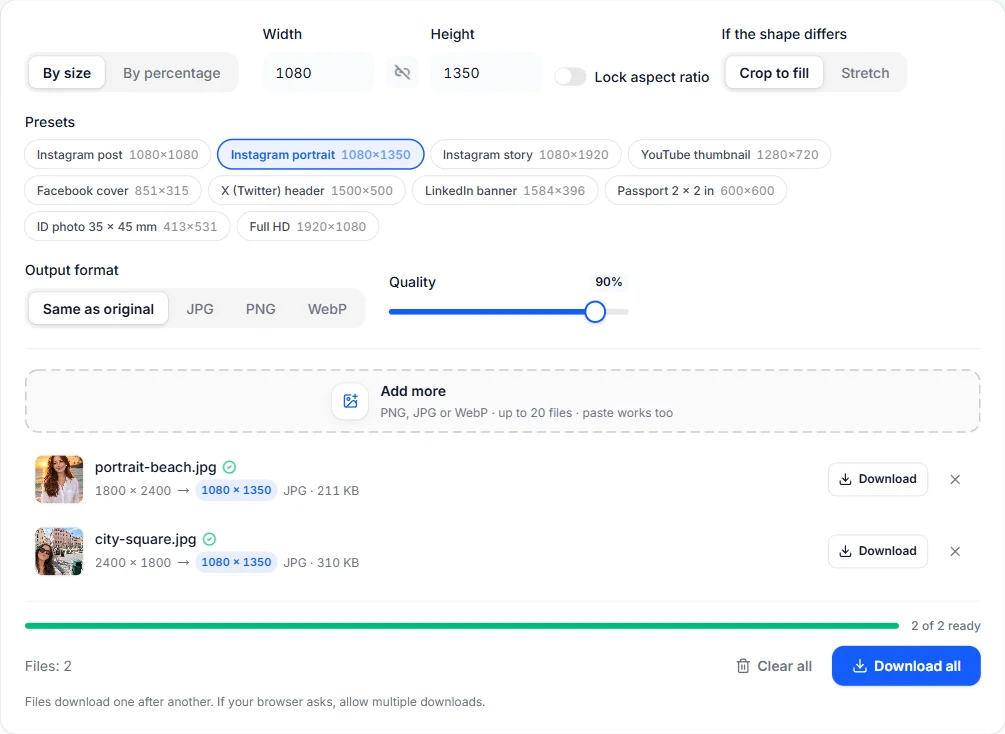
Precise sizes, sensible defaults and nothing to install.
Type an exact width and height, or scale everything by a percentage in one step.
Keep proportions locked so images are never squashed, or unlock them to set any size.
One-click sizes for Instagram posts and stories, YouTube thumbnails, Facebook and X covers, and passport and ID photos.
When a preset has a different shape than your photo, the image is centered and cropped to fill it exactly, without distortion.
Resize up to 20 images to the same size at once.
Resizing runs in your browser with high-quality smoothing. Nothing is uploaded and there are no limits or credits.
Match the sizes platforms recommend so your posts, stories and thumbnails aren't cropped unexpectedly.
Bring a photo to the pixel size an online application asks for. Always check the official requirements for your document.
Shrink large photos to sensible widths so pages and emails load quickly.
Keep Lock aspect ratio switched on. The image is scaled to fit the width and height you set while keeping its proportions. For an exact size with a different shape, pick a preset or choose Crop to fill.
Common sizes are 1080 × 1080 pixels for a square Instagram post, 1080 × 1350 for a portrait post, 1080 × 1920 for a story and 1280 × 720 for a YouTube thumbnail. Platforms update their guidance from time to time, so check their help pages for the latest numbers.
You can resize and crop a photo to a passport or ID pixel size, such as 600 × 600 pixels for a US passport photo. Rules for background, lighting and head size differ by country, so always check the official requirements.
Yes, up to 200%, but enlarging can't add real detail, so big enlargements look soft. For sharper results, use the AI image upscaler.
No. Resizing happens entirely in your browser. Your images never leave your device.
You can resize JPG, PNG and WebP images and save the result as JPG, PNG or WebP. Other formats your browser can open, like GIF, BMP or AVIF, also work as input.
Free browser tools and AI tools for whatever comes next.
Open the free online editor to add text, crop precisely and design posts at the size you need.