01
Faster web pages
Lighter images load faster, use less mobile data and help your page speed scores.
Shrink JPG, PNG and WebP images by adjusting quality and size. Preview the result, compare before and after, and see the savings for every file.
Your files are processed on your device and are never uploaded.
Drop JPG, PNG or WebP files or choose them from your device. You can compress up to 20 at once.
Move the quality slider, choose the output format and, if you like, a maximum width. The results update as you go.
Download each image or use Download all. Files that wouldn't get smaller are kept as the original.
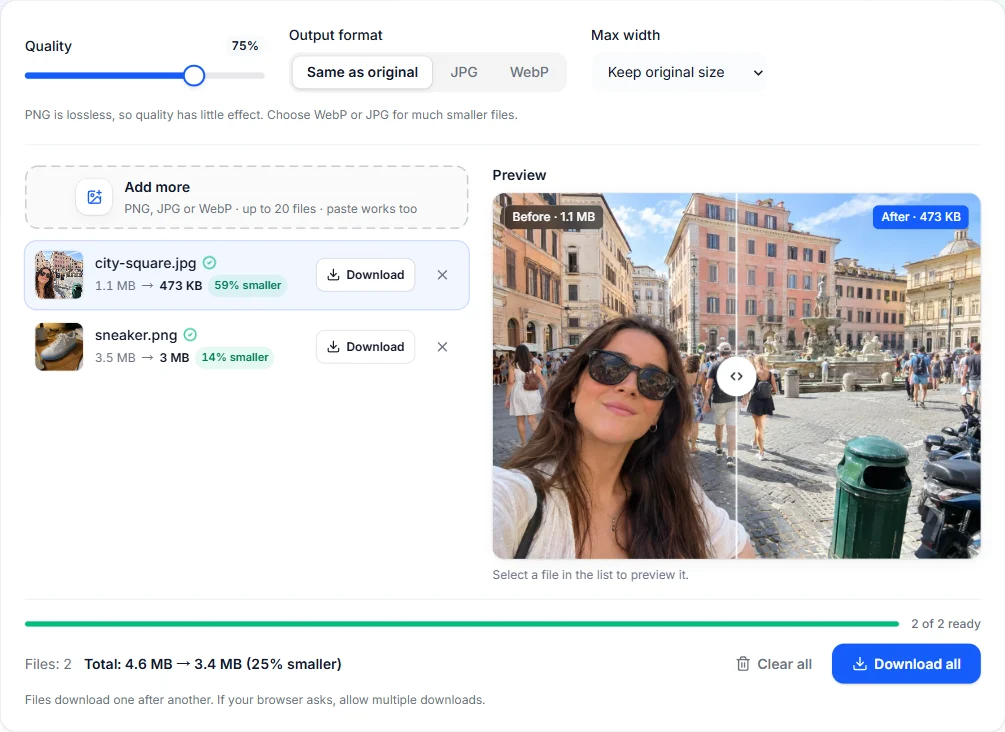
See the size and the quality before you download.
Drag the slider across the preview to check that the compressed image still looks right.
See the original size, the new size and the percentage saved for each file and for the whole batch.
Pick the balance between file size and sharpness that fits your use, from tiny thumbnails to print-ready photos.
Set a maximum width to shrink oversized camera photos, usually the biggest single saving for web images.
If a compressed file would end up larger than the original, the original is kept.
Compression runs in your browser. Nothing is uploaded, and there is no account, credit cost or limit.
Lighter images load faster, use less mobile data and help your page speed scores.
Get photos under the size limits of email attachments, application forms and marketplaces.
Shrink large phone photos before backing them up or sharing them in chats.
Yes, completely free, with no account, credits or watermark.
No. Images are compressed by your browser on your device. They never leave your computer or phone.
It depends on the image and the settings. Photos saved at high quality often shrink a lot at a quality of 70 to 80 with no visible difference, and lowering the width saves even more. The tool shows the exact result for every file.
Yes. PNG is lossless, so the quality slider has little effect if you keep PNG. For much smaller files, convert PNG photos to WebP or JPG, or reduce their width. Choose WebP to keep transparency.
JPG and WebP compression removes detail your eye is unlikely to notice. At low quality settings you may see blur or blocky areas, so use the before and after preview to pick the right level.
No. Images are redrawn on a canvas, so metadata such as GPS location, date and camera model is removed. That makes the files smaller and more private.
Free browser tools and AI tools for whatever comes next.
Open the free online editor to crop, retouch and export exactly the size you need.